
VideoDB × LlamaIndex: plug video into your RAG pipeline.
The official VideoDB connector for LlamaIndex lets you treat video as a first-class source in any retrieval-augmented pipeline.
Most RAG systems are fluent in text. They can parse docs, chunk PDFs, embed web pages, and retrieve the paragraph that grounds an answer. But video is where a lot of the real world lives: product demos, lectures, security footage, training calls, sports clips, meetings, tutorials, news, livestreams. If your RAG pipeline cannot retrieve video moments, it is blind to one of the highest-bandwidth knowledge sources you have.
The VideoDB retriever for LlamaIndex changes that shape. It lets a LlamaIndex app retrieve from VideoDB collections and videos, return timestamped nodes, synthesize text answers, and then turn the same retrieved moments into playable clips. The answer is no longer just a paragraph. It can come with evidence you can watch.
“Video RAG should not end at a generated sentence. It should take you to the exact moment the answer came from.”
Why video breaks normal RAG
A video is not a long document. It is a timeline of speech, visuals, motion, and context.
Text RAG works because text is already symbolic. A paragraph can be embedded, retrieved, and passed to an LLM. Video needs more infrastructure before it becomes retrievable.
You need transcript indexing for what was said and scene indexing for what was shown. You also need timestamps for where each moment lives, and a playback layer that can return the matching clip after retrieval.
- Speech matters: a training video may explain the answer verbally while the slide on screen stays static.
- Visuals matter: a product demo, sports play, or surveillance moment may be obvious on screen but never mentioned out loud.
- Time matters: a retrieved answer is only useful if you can jump to the moment and verify it.
That is the role split. LlamaIndex orchestrates retrieval and response synthesis. VideoDB stores, indexes, searches, and streams the video evidence.
The architecture
VideoDB makes video look like a retrieval source without flattening it into text-only context. Spoken words and visual scenes become searchable nodes, each with metadata such as video_id, start, and end. LlamaIndex can then use those nodes the same way it uses other retrieved context. VideoDB uses the timestamps to generate clips.
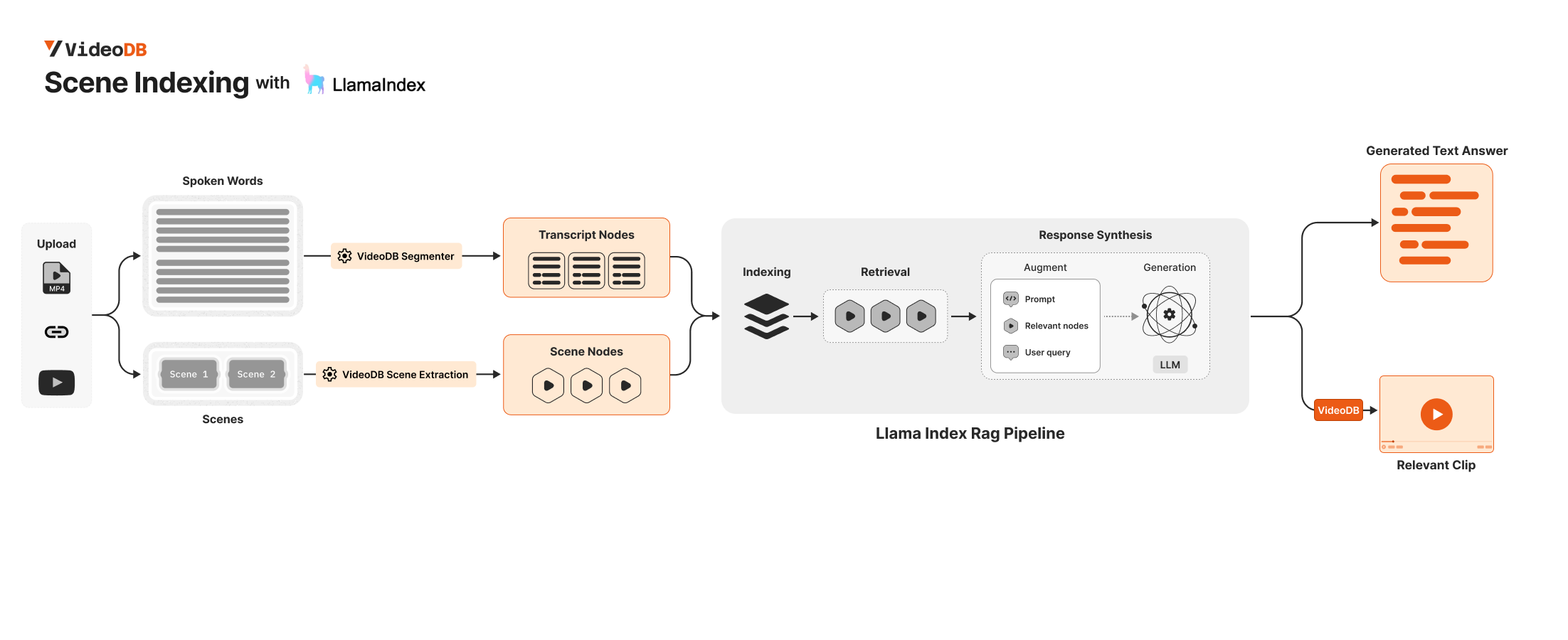
This is the key mental model: retrieval and playback are connected. The node that helps the model answer also contains the time range needed to produce the video stream.
RAG with evidence
Instead of stopping at “the answer is likely X,” your app can show the clip where X was said or shown. That makes video RAG useful for workflows where verification matters.
Start with the retriever
The official retriever lives in the LlamaIndex retriever package for VideoDB. Install it alongside VideoDB and LlamaIndex:
pip install videodb llama-index llama-index-retrievers-videodbThen connect to VideoDB, upload a video, and index the spoken content. This creates the transcript-backed search surface for semantic retrieval over what people say in the video.
import os
import videodb

os.environ["VIDEO_DB_API_KEY"] = "YOUR_VIDEO_DB_API_KEY"

conn = videodb.connect()
coll = conn.get_collection()

video = coll.upload(url="https://www.youtube.com/watch?v=LPZh9BOjkQs")
video.index_spoken_words()
Now the video can participate in a LlamaIndex retrieval flow through VideoDBRetriever.
from llama_index.retrievers.videodb import VideoDBRetriever
from videodb import SearchType, IndexType

spoken_retriever = VideoDBRetriever(
    collection=coll.id,
    video=video.id,
    search_type=SearchType.semantic,
    index_type=IndexType.spoken_word,
    score_threshold=0.1,
)

nodes = spoken_retriever.retrieve("Where does the speaker explain transformers?")
The retriever returns LlamaIndex nodes with VideoDB metadata attached. That metadata is what lets the app cross the boundary from text response back to video playback.
Turn retrieved nodes into an answer
Once VideoDB has returned relevant nodes, LlamaIndex can synthesize a response over them. This is the familiar RAG pattern, except the retrieved context came from a video timeline.
from llama_index.core import get_response_synthesizer

query = "Where does the speaker explain transformers?"

response_synthesizer = get_response_synthesizer()
response = response_synthesizer.synthesize(
    query,
    nodes=nodes,
)

print(response)
At this point you have a normal generated answer. But with VideoDB, you also still have the source moments.
Then generate the clip
Every retrieved node includes a start and end time. For a single video, pass those intervals into video.generate_stream() and VideoDB creates a playable stream from the relevant moments.
from videodb import play_stream

intervals = [
    (node.node.metadata["start"], node.node.metadata["end"])
    for node in nodes
]

stream_url = video.generate_stream(timeline=intervals)
play_stream(stream_url)
This is where video RAG becomes different from document RAG. A document answer cites a source. A video answer can compile the source into a stream.
Bring in visual understanding
Speech alone is not enough for real video intelligence. Many important moments are visual: a diagram appears, a product screen changes, a person enters a frame, an object is held up, a slide shows a formula. VideoDB scene indexing turns visual moments into searchable scene descriptions.
scene_index_id = video.index_scenes(
    prompt=(
        "Describe each scene with objects, actions, text on screen, "
        "and any visual context needed for retrieval."
    )
)

scenes = video.get_scene_index(scene_index_id)
You can retrieve from that scene index with the same retriever interface by changing index_type and passing the scene index id.
scene_retriever = VideoDBRetriever(
    collection=coll.id,
    video=video.id,
    search_type=SearchType.semantic,
    index_type=IndexType.scene,
    scene_index_id=scene_index_id,
    score_threshold=0.1,
)

scene_nodes = scene_retriever.retrieve("Show the part with a matrix or formula on screen")
Now your RAG app can ask two different questions of the same video: what was said, and what was shown.
Multimodal RAG in practice
The best video queries are often mixed: “What does the speaker say when this visual appears?”
A practical multimodal flow retrieves from both indexes, combines the nodes, and lets LlamaIndex synthesize over the union. The spoken index provides narration and dialogue. The scene index provides visual context. VideoDB preserves the timestamps for both.
query = "Explain the section where the speaker discusses attention and shows a matrix."

spoken_nodes = spoken_retriever.retrieve(query)
scene_nodes = scene_retriever.retrieve(query)

response = response_synthesizer.synthesize(
    query,
    nodes=spoken_nodes + scene_nodes,
)

print(response)
For more custom pipelines, you can also fetch transcript and scene records from VideoDB, convert them into LlamaIndex TextNode objects, and build a standard VectorStoreIndex. That pattern is useful when you want to mix VideoDB nodes with other application-specific documents, rerankers, or query transformations.
from llama_index.core.schema import TextNode
from llama_index.core import VectorStoreIndex

transcript_nodes = [
    TextNode(
        text=item["text"],
        metadata={key: value for key, value in item.items() if key != "text"},
    )
    for item in video.get_transcript()
]

scene_nodes = [
    TextNode(
        text=scene["description"],
        metadata={key: value for key, value in scene.items() if key != "description"},
    )
    for scene in scenes
]

index = VectorStoreIndex(transcript_nodes + scene_nodes)
query_engine = index.as_query_engine()
Collection-level retrieval
VideoDB is not limited to one file. The retriever can target a whole collection. That is where video RAG becomes genuinely useful for libraries: a folder of lectures, a set of support recordings, a season of sports footage, or a company’s meeting archive.
When retrieval spans multiple videos, each node still carries the video_id, start, and end metadata. You can use VideoDB timelines to compile clips from multiple source videos into a single stream.
from videodb.timeline import Timeline
from videodb.asset import VideoAsset

timeline = Timeline(conn)

for node_with_score in spoken_nodes + scene_nodes:
    node = node_with_score.node
    timeline.add_inline(
        VideoAsset(
            asset_id=node.metadata["video_id"],
            start=node.metadata["start"],
            end=node.metadata["end"],
        )
    )

stream_url = timeline.generate_stream()
play_stream(stream_url)
That makes retrieval compositional. The model finds the evidence, and the timeline turns that evidence into a watchable answer.
What builders can ship
1. Support answers with video proof
Instead of answering a customer from a stale help article, retrieve the exact product walkthrough clip where the behavior is demonstrated.
2. Training libraries that answer questions
Employees can ask a natural-language question and jump straight into the training moment that explains it.
3. Meeting and lecture memory
Search across recordings, synthesize the answer, and include the clip where the decision, explanation, or visual was captured.
4. Visual search for agent workflows
Agents can retrieve not only what was said, but what was visible on screen: forms, dashboards, slides, products, diagrams, actions, and state changes.
Try the notebook
The VideoDB cookbook includes a Simple Video RAG notebook for LlamaIndex. Use it as a starting point, then add scene indexes and timeline generation for richer multimodal answers.